
Real-time feedback on handwritten STEM work
Every notebook checked before the lesson ends.
What if you could see inside every notebook at once?
Students solve on paper and scan with a phone. ClassBricks pins each mistake and drafts the feedback for you to approve.
Two live sessions free. No card required.
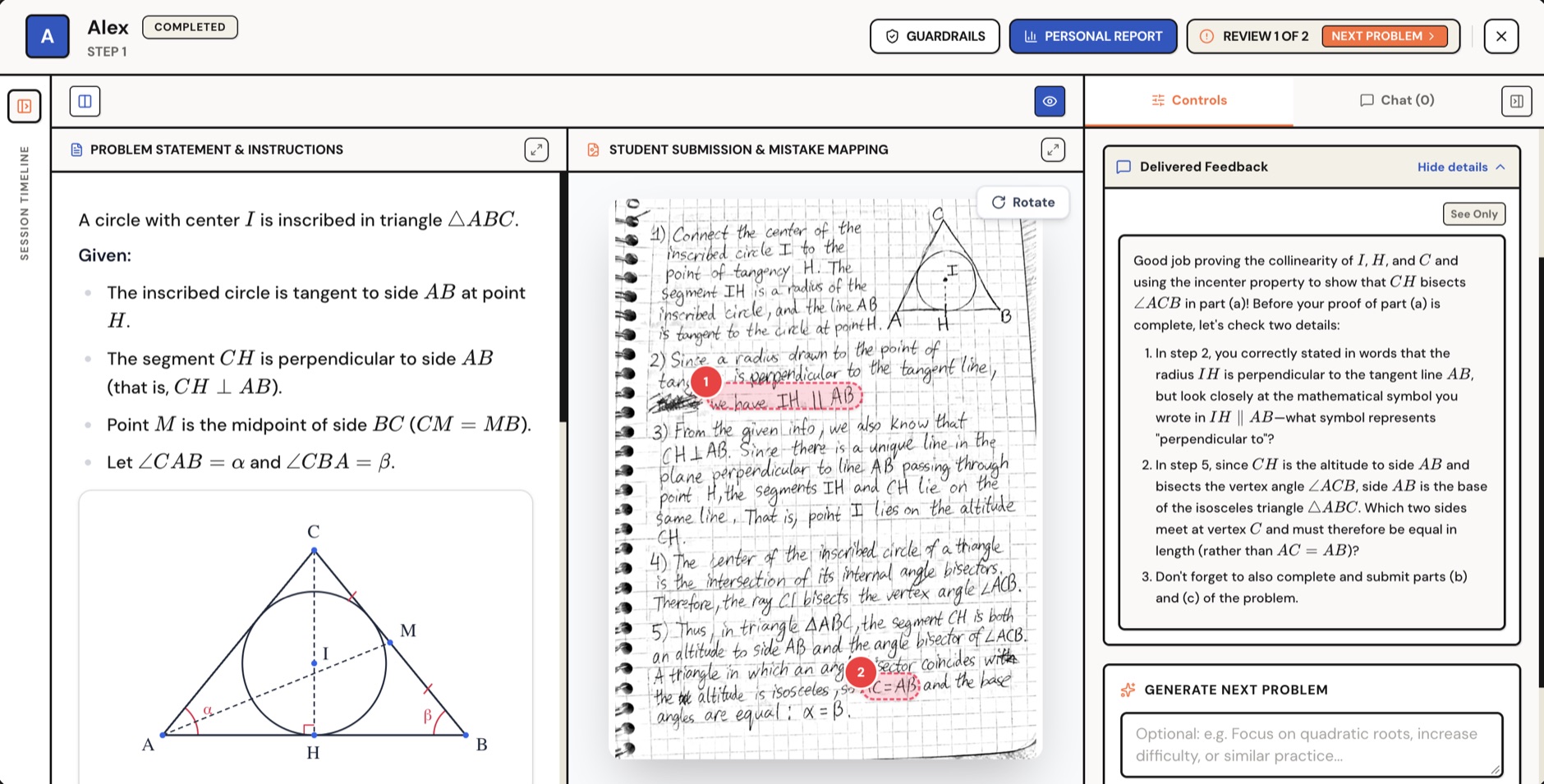
Nothing reaches a student until you say so.
Approve
The feedback is right. Send it and move the student on.
Request a revision
Send your notes back. The student fixes the work in their notebook and scans it again.
Branch to a remedial problem
The gap is deeper. Give the student a simpler problem on the same idea before they go on.
One loop, inside the lesson.
Find out who is stuck while there is still time to help.
-
Create
Upload a worksheet or describe the topic. Get a problem set in seconds.
You -
Solve
Students work on real paper with a pen. No laptops open.
Students -
Scan
Each student photographs the page with a phone.
Students -
Review
Mistakes arrive pinned and explained. You edit or approve the feedback.
You -
Adapt
Hint the stuck. Stretch the fast finishers. Run the next round.
You
What you get in the room.
Start from the materials you already teach
Upload a worksheet as a PDF or a photo, or type what you want to practise. Choose exact questions to keep your worksheet word for word, or resembling questions to get fresh ones on the same topic, at the same difficulty. Edit anything afterwards.
- Questions can carry diagrams
- No mandatory question bank or publisher content


See the whole class on one screen
Every student gets a tile that shows where they are and whether their work is waiting for you. You know who needs help without walking the room or collecting a single sheet.
- Filter by needs review, active or waiting
- Give one plan to the group, or a different one to each student
Hints for students, in full view of the teacher
A stuck student can ask for a hint, a place to start or the right formula without leaving the problem. You can read every conversation and step in at any time.
- No separate chatbot open in another tab


A phone is enough
Students read the question, scan their notebook and get feedback on the same phone. Laptops and tablets work too, and there is nothing to install.
- 1 Read the question
- 2 Scan the notebook page
- 3 Get feedback
Built for step-by-step STEM.
ClassBricks is for subjects where the working matters more than the final answer. It reads the steps a student wrote, checks them against the method you asked for and tells a small slip from a deeper misunderstanding.
Mathematics
Algebra, geometry and calculus, where a skipped step or a sign error decides the answer.
Physics
Derivations and worked problems, where one early slip carries through to the result.
Chemistry
Balancing equations, stoichiometry and multi-step calculations.
Engineering and computing
Anything else solved line by line on paper.
Equations and scientific notation read the same in every language, and the interface is multilingual.
In the room or online.
Every submission in one view
Students write on paper with no laptops open. Their work appears side by side as they finish, so you can see who needs you and who is ready for the next problem.
Real paper in online classes
Students solve at home and send their work. No typing equations into a chat box and no notebooks held up to a webcam.
Students join with a class code
No account, no password and no email address.
Never used for training
Your materials and your students' work are not used to train any AI model.
Your content stays yours
You keep ownership of everything you upload.
Start free. Pay when your classes grow.
A session is one student in one live class. A class with five students uses five sessions.
Free trial
Test it live with your students. No card required.
- ✓ 2 live sessions
- ✓ Up to 6 students per class
- ✓ 10 AI-generated questions
- ✓ 3 saved lesson plans
- ✓ Phone scanning and grading
Core
For teachers and tutors running small classes.
- ✓ 30 sessions a month
- ✓ Up to 6 students per class
- ✓ 60 AI-generated questions a month
- ✓ 15 saved lesson plans
- ✓ Diagnostic reports for homework and warm-ups
- ✓ 1 syllabus upload
Pro
For educators running several classes.
- ✓ 100 sessions a month
- ✓ Up to 12 students per class
- ✓ 250 AI-generated questions a month
- ✓ 50 saved lesson plans
- ✓ Diagnostic reports with printable PDF
- ✓ 5 syllabus uploads and multi-plan tracks
Paid plans are billed monthly and you can cancel at any time. If you run over your sessions, the lesson keeps going.
For tutors: a four-student class at €100 an hour earns €65 more than a €35 one-to-one lesson. The first group lesson covers Core for the month.
See it with your own worksheet.
Book a free 30-minute call on Google Meet. Bring a problem set from your course and we will run it through ClassBricks live.